Running the system locally
Venues often have weak or no internet. The system can run on a laptop instead: the laptop runs the app with its own database, and the judges' phones connect to it over a shared hotspot, so judging never depends on the internet. When the laptop has internet, it syncs with the main site in the background.
Everything else works as in Running an event as head judge; this page covers only what is different.
What you need
- A laptop (these steps are for Windows) that stays plugged in for the event.
- A Wi-Fi hotspot or router that the laptop and every judge device join. A phone hotspot works. It doesn't need internet, but internet lets the results reach the main site during the event.
- An account with an email and password sign-in and Head Judge access. Discord sign-in needs the internet, so it can't be used on the laptop. Ask an admin if you don't have one.
- The app's settings file,
web/.env.local, from the project owner. It holds the passwords the laptop uses to sync with the main site: keep it private and never share it.
One-time setup on the laptop
Do this at home with good internet, a few days before the event.
1. Install Postgres
Download it from postgresql.org/download (on Windows, the EDB installer). Keep the default port 5432 and remember the postgres password you choose. You don't need to create a database: the app does that.
3. Get the app and build it
Open a terminal and run these. Put the .env.local file into the web folder before building.
git clone https://github.com/SmilesAir/FullstackFreestyleTools.git
cd FullstackFreestyleTools/web
npm install
npm run build
npm run start:local
npm run start:local starts the app and prints the addresses the judges will open. Leave the terminal open while the app runs; closing it stops the app.
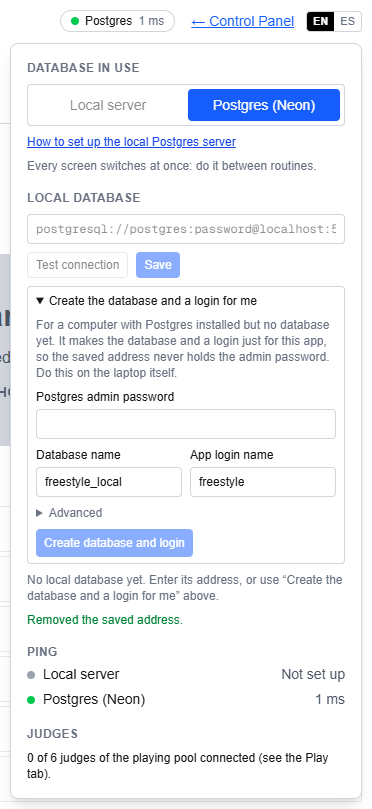
4. Create the local database from the page
- On the laptop itself, open
http://localhost:3000(not its network address) and sign in with your email and password. - Open Head Judge and click the database pill at the top (it says Postgres (Neon)).
- Under Local database, open Create the database and a login for me, enter the Postgres admin password from step 1 and click Create database and login.
That makes the database and its tables, and saves its address on the laptop. The admin password is used once and never stored. Doing it again is safe.
web folder run git pull, npm install and npm run build, then npm run start:local.At the event
1. Set up the event on the main site first
Set up the divisions, pools, teams and judges in the Event Creator as usual (on the main site, or on the laptop while it is online). Any later change is still made there and is pulled down to the laptop.
2. Start the laptop
Join the laptop to the hotspot and run npm run start:local in the web folder. Open http://localhost:3000, sign in and open Head Judge.
3. Take the event offline and switch to the local server
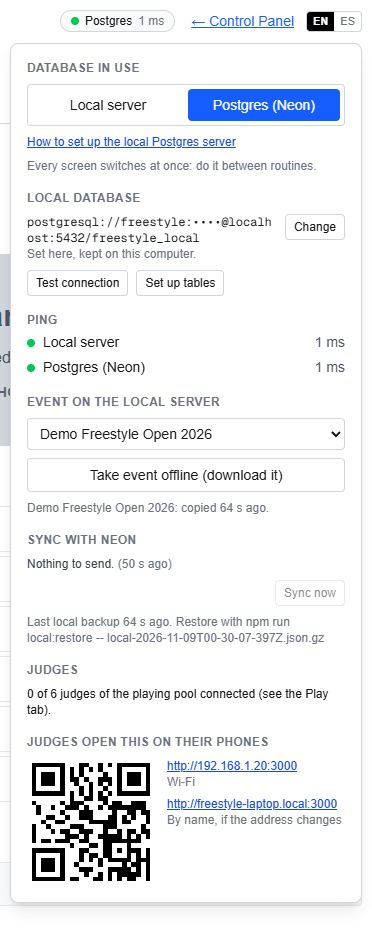
- Click the database pill and choose the event.
- Click Take event offline (download it). This needs internet.
- Switch to Local server. Every screen switches at once, so do it between routines.
4. Connect the judges
Each judge joins the same hotspot and scans the QR code in the database pill (or types the address shown there, like http://192.168.1.20:3000). From there it is the same as Step 4 of the head judge guide: don't sign in, press their own button and enter the judge PIN.
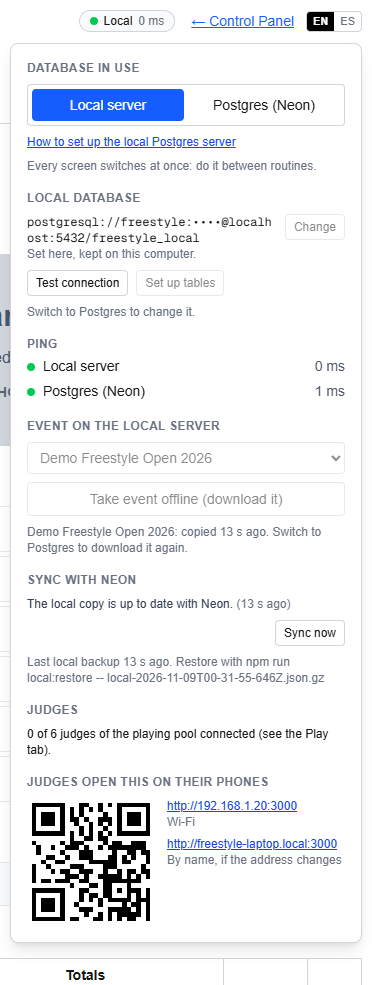
5. Run the event as usual
Head Judge works the same. On the local server, the head judge's and judges' screens update every second.
6. Finish
Before shutting the laptop down, connect it to the internet and switch the pill back to Postgres (Neon). That sends everything first. Check the pill says nothing is waiting to send.
What happens where
| What | Where it happens |
|---|---|
| Event setup (divisions, pools, teams, judges, players) | Edited on the main site, and pulled down to the laptop when it changes. |
| Judging (routines, notes, scores, results, play state) | Made on the laptop, and sent up to the main site every 30 seconds when there is internet. Sync now in the pill sends it at once. |
| Who is up and the routine timer | Sent to the main site straight away, so screens there keep up within a few seconds. |
| Event Music and the announcer page | Use them on the main site (songs need the internet). They still follow the team that is up. |
| Public results links | Served by the main site, so they show the results once the laptop has synced. |
| Sign-in | Email and password on the laptop. Discord sign-in needs the internet. |
If a phone can't reach the laptop
- Allow the app through Windows Firewall for the hotspot's network. Windows may class it as Public.
- Make sure the hotspot doesn't isolate devices from each other (client or AP isolation off).
- Use the address shown in the pill. The
.localname is a backup for when the IP address changes. - If the page loads on the phone but never updates and nothing can be pressed, the app was started with
npm run dev. Stop it and usenpm run buildthennpm run start:local.
Backups and starting over
Safety backups
The laptop backs up its database before anything in it is replaced (the newest 20 are kept in web/.local/backups). To restore one, stop the app, then:
npm run local:restore              # lists the backups
npm run local:restore -- <file name>
Starting over with a fresh laptop
- Switch the pill to Postgres (Neon) (this sends anything not yet sent), then stop the app.
- Delete the database and its login in Postgres, for example in
psql -U postgres:DROP DATABASE freestyle_local WITH (FORCE); DROP ROLE freestyle; - Delete the
web/.localfolder. - Start the app and do step 4 of the one-time setup again.
Nothing on the main site is touched by this.
For developers
To work on the app, run npm run dev in the web folder and open http://localhost:3000. It uses the database named in .env.local until the pill is switched to the local server. Use npm run start:local for events, since npm run dev can block other devices. The README has the technical details.